
Download Dogfood – AI‑Powered Product Testing Tool, Automated Validation, Scalable Insights
Overview
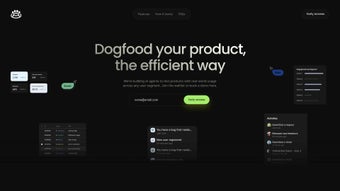
Dogfood is an AI‑driven product‑testing platform that redefines how product teams validate concepts before they go live. By leveraging multimodal AI agents capable of voice, text, and visual interaction, Dogfood can mimic real‑world user behavior across a wide range of demographics without the need for costly recruiting or manual sessions. The platform automatically discovers new user segments, continuously refines existing ones, and aggregates both quantitative metrics and qualitative feedback in a single, real‑time dashboard.
This automation shortens validation cycles from weeks to hours, reduces budget pressure, and improves confidence in roadmap decisions. Dogfood integrates natively with leading CRMs, analytics suites, and version‑control systems, turning raw test data into actionable insights that feed directly into development pipelines. Whether you are a bootstrapped startup seeking product‑market fit or an enterprise scaling validation across dozens of product lines, Dogfood delivers a secure, scalable, and cost‑effective solution that accelerates time‑to‑market while preserving the authenticity of user experience testing.
Its secure cloud architecture, ISO‑27001 certification, and GDPR‑ready controls ensure that sensitive data remains protected throughout every test iteration.
Key Features and Benefits
- Multimodal AI Agents: Simulate voice, text, and visual interactions for realistic user experiences.
- Dynamic Segment Discovery: AI continuously identifies emerging user groups and updates personas.
- Unified Testing Suite: Conduct user interviews, A/B tests, UX flows, and heat‑map analysis from one dashboard.
- Customizable Personas: Build detailed personas by demographics, psychographics, or device preferences.
- Real‑Time Chat with Agents: Ask follow‑up questions and receive instant feedback during live sessions.
- Scalable Architecture: Supports thousands of concurrent agents for both small beta programs and enterprise rollouts.
- Robust Data Integration: Native connectors for Salesforce, HubSpot, Google Analytics, Mixpanel, GitHub, and more.
- Secure Cloud Hosting: End‑to‑end encryption, role‑based access, and ISO‑27001 compliance.
- Automated Reporting: Generates PDFs, dashboards, and API endpoints for continuous delivery pipelines.
- Cost‑Effective Pricing: Tiered subscription plans and a free community tier make high‑quality validation accessible.
Pros
- Automates user‑segment discovery, eliminating manual research.
- All major testing methods are available in a single platform.
- Highly scalable – thousands of AI agents can run simultaneously.
- Seamless integration with existing analytics and development tools.
- Secure, GDPR‑compliant architecture protects sensitive data.
- Flexible pricing accommodates startups and large enterprises alike.
Cons
- Initial learning curve for teams new to AI‑driven testing.
- Requires a stable internet connection; offline mode is unavailable.
- Custom integrations beyond native connectors need developer resources.
- Advanced persona customization may demand prompt‑engineering expertise.
- Enterprise‑scale deployments can become costly, though still cheaper than traditional agencies.
Installation, Setup, and Compatibility
Dogfood is delivered as a fully hosted SaaS solution, so there is no heavy client‑side installation. After subscribing, you receive a secure invitation link that grants immediate access to the web‑based console. The built‑in setup wizard guides you through three core steps: connecting data sources, creating AI personas, and selecting testing methodologies.
Step‑by‑Step Installation:
- Visit dogfood.ai/signup and register an administrator account.
- Confirm your email; a one‑time password (OTP) will be sent for added security.
- Log in and click “Add Integration.” Choose from pre‑built connectors (Salesforce, HubSpot, Google Analytics) or configure a custom REST API.
- Open “Persona Builder.” Select a template or start from scratch, then define demographics, device preferences, and behavioral triggers.
- Configure your testing plan: pick “User Interview,” “A/B Test,” “UX Flow,” or a combination. Set success criteria, timeline, and sample size.
- Press “Launch.” Dogfood provisions AI agents in the cloud, begins data collection, and streams results to your dashboard in real time.
Operating System Compatibility: Because the platform runs entirely in the browser, it works on any modern OS that supports Chrome, Edge, Firefox, or Safari. This includes Windows 10/11, macOS Ventura and later, and popular Linux distributions. For mobile monitoring, companion apps are available for Android 8.0+ and iOS 13+. System requirements are modest: a stable 5 Mbps internet connection and a recent browser version. Organizations with strict data‑residency rules can deploy Dogfood on‑premise via a Docker container on private clouds (AWS, Azure, GCP), retaining full feature parity.
Frequently Asked Questions & Conclusion
Frequently Asked Questions
What types of products can I test with Dogfood?
Dogfood is product‑agnostic. It can test mobile apps, web SaaS platforms, IoT devices, and even service workflows by programming AI agents to mimic the appropriate user interactions.
How does Dogfood ensure data privacy and compliance?
All data is encrypted with TLS 1.3, the service is ISO‑27001 certified, GDPR‑ready, and offers role‑based access controls. On‑premise Docker deployments keep data within your own network for regulated industries.
Can I integrate Dogfood with my CI/CD pipeline?
Yes. Dogfood provides a RESTful API and native webhooks that can trigger tests after each build, feed results into Grafana or PowerBI, and even block deployments if usability thresholds aren’t met.
Is there a free trial or free tier?
Dogfood offers a 14‑day free trial with full feature access. A limited “Community” tier provides up to 100 AI‑agent minutes per month at no cost, ideal for early‑stage startups.
How quickly can I expect results from a test run?
Because AI agents operate in parallel, most scenarios return actionable insights within 30 minutes to 2 hours, depending on sample size and complexity.
Conclusion – Why Download Dogfood Today?
In today’s fast‑paced market, speed, accuracy, and data‑driven decisions separate winners from laggards. Dogfood combines AI automation, dynamic segment discovery, and a unified testing suite to deliver insights that traditional manual methods simply cannot match. By eliminating the bottleneck of recruiting real users and allowing you to run thousands of realistic simulations in minutes, Dogfood empowers product teams to iterate faster, reduce risk, and launch with confidence. The platform’s secure, GDPR‑compliant cloud, flexible pricing, and seamless integration with your existing toolchain make it a pragmatic choice for startups and enterprises alike. Don’t let outdated testing processes slow you down—download Dogfood now, start your free trial, and experience a new era of intelligent product validation.
Pros: Automated segment discovery, multi‑method testing, seamless integration, high scalability.
Cons: Learning curve for AI persona creation, reliance on internet connectivity.



.png)



